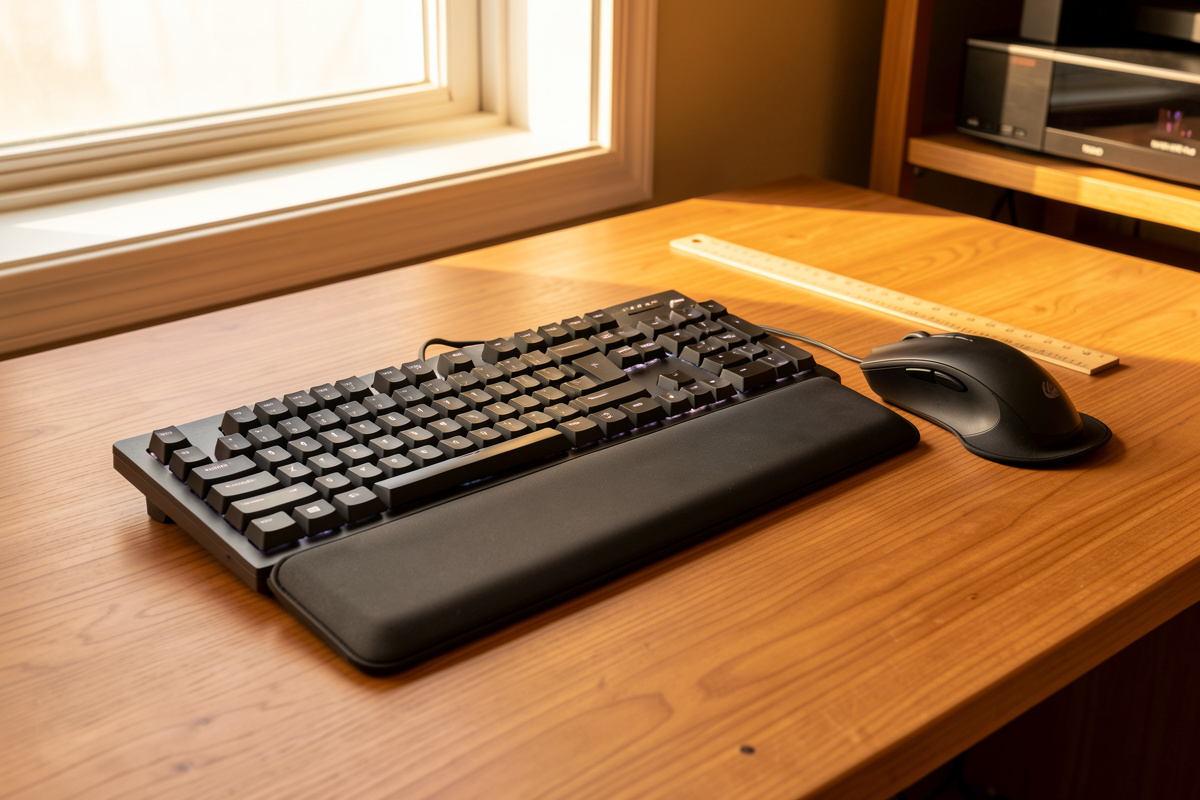

A wrist pad’s real job is to give your hands a place to rest between typing bursts at the right height — the top of the pad within about a centimeter of your home-row keys. The moment you plant your wrist on it and pivot, it stops helping. In my setup log the pads that earned their keep were really palm rests, used as a rest station and never pressed into while keys were moving.
I have measured a lot of hands against a lot of pads at this desk. The single distinction that decided whether a pad helped or hurt was contact point: where the support landed on the hand, and whether the hand floated or planted while typing. Everything below is built around that one measurement.
The Rule: Rest, Don’t Press
The whole argument fits in four words. A pad is for resting your hands during the gaps. It is not a place to drive your wrist down while you type, because planting the wrist there pins it at an angle and concentrates the load on one small contact point.
When I watch myself type fast, my hands hover. Fingers travel, the wrist stays roughly level, and nothing touches the pad. Then I stop to read something, and the heels of my palms drop onto the pad to rest. That cadence is the goal: float while moving, rest in the pauses. A pad that invites you to plant and pivot for hours is working against neutral wrist position, not for it.

Palm Rest vs Wrist Rest: Where Contact Should Land
People use these terms interchangeably, but the difference is the contact point, and that distinction decides whether the support works. The heel of your palm is meant to bear weight. The underside of your wrist, with its tendons and the bony bits near the joint, is not.
A palm rest catches you under the heels of the hands, the meaty pads below the thumb and little finger. Weight lands on tissue built to carry it, the wrist stays straight, and the fingers can still reach the keys. A so-called wrist rest, used the way the name suggests, catches you further back at the joint and tips the hand upward into extension. In my setup log the same physical pad could be either one, depending entirely on how far forward I sat and how high the keyboard was. The pad did not change. The contact point did.
So treat “wrist pad” as a loose shopping term and aim, in practice, for palm contact. If you find yourself bridging your hand back so the joint sits on the pad and the fingers angle up to reach the keys, the pad is too far back or too tall, and it has quietly become the wrist rest you did not want.
Matching Pad Height to Key Height
The number that matters most is height. The top of the pad should sit close to the height of the keys your fingers rest on, so the hand stays in a straight line from forearm to knuckles. Too tall and the wrist bends up; too short and it sags down. Both pull you out of neutral.
I keep a small geometry kit at the desk and I measure this directly: the front edge height of the keyboard at the home row, then the top surface of the pad. On a low-profile board the home keys might sit only a centimeter or so above the desk, which means a fat pad overshoots badly and forces the wrist up. On a tall mechanical board with a steep front, a thicker pad can actually line up. There is no universal pad height. There is only the pad height that matches your board.
This is also where keyboard tilt earns a mention. Most people prop the back feet up, which raises the far edge and tips the front down toward you, so the wrist has to extend up to reach the keys. Flattening the board, or better, running a slight negative tilt where the front edge is higher than the back, drops the need for a tall pad almost entirely. With negative tilt and a low board, my hands float level on their own and the pad goes back to being a rest station, which is all it was ever supposed to be. If you are still dialing in board position, the keyboard height for typing walkthrough covers where the home row should land relative to your elbow.
Materials and How They Age
The pad I buy today is not the pad I have in a year. Foam compresses, gel migrates, and a pad that started at the right height can slump below it. So I judge materials less on day-one feel and more on whether they hold their shape after months of the same hand landing in the same spot.
Here is how the common materials sorted out across my own pads, including the keyboard-pad versus mouse-pad split, since the two get used differently.
| Material | Feel | Holds shape over time | Best contact use | Rough price band |
| Gel | Soft, cool, gives a lot | Poor, the gel migrates away from the landing zone and leaves a dip | Light palm contact if you can replace it yearly | Low |
| Memory foam | Plush, molds to the heel of the hand | Fair to poor, flattens in the spot you use most | Mouse wrist pad where a soft cradle helps | Low to mid |
| Firm foam (high density) | Supportive, slight give | Good, recovers between sessions and keeps its height | Keyboard palm rest, my default | Mid |
| Hard or wood | Solid, no give at all | Excellent, the height never changes | Palm contact for people who rest lightly and want consistency | Mid to high |
| Keyboard pad (long bar) | Spans the full board width | Depends on fill, firm foam best | Resting both palms level across the board | Low to mid |
| Mouse pad (small cushion) | Compact cradle under the heel | Often memory foam, flattens fastest | Mouse hand only, watch for trapping | Low |
The short version: gel and memory foam feel best in the store and age worst at the desk, because they flatten exactly where your hand lands and drop below key height. Firm high-density foam and hard or wood pads feel less pillowy on day one but hold their height, which is the property that actually matters for staying neutral. After months on the same firm pad I was still at the height I measured on day one. The gel pad I tried had a visible dip within weeks.
The Mouse Wrist Pad Question
The mouse side is its own decision, and it cuts both ways. A small cushion under the heel of the mouse hand can let the hand glide and keep the wrist level instead of cocked up off a hard desk edge. That is the helpful case: support that keeps the hand floating and moving.
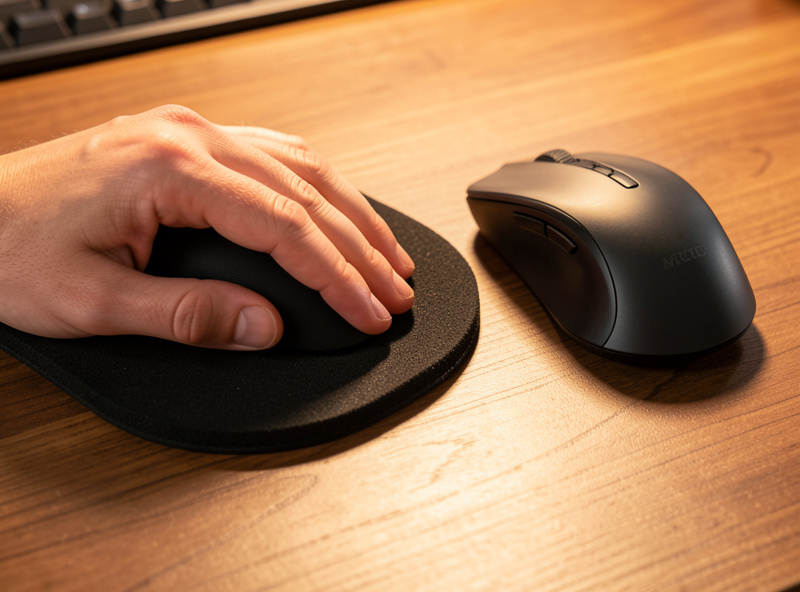
The trap is the opposite case. If the pad anchors the heel of your hand in one place, you stop moving the whole arm and start pivoting at the wrist to steer the cursor. That pins the contact point and twists the wrist side to side all day. A mouse that wants arm movement, which most ergonomic shapes do, fights against a pad that traps the hand. In my setup log the mouse pads that worked were the ones I could still slide on, so the hand traveled with the mouse instead of staying planted. If you are reworking the mouse hand entirely, the ergonomic mouse buying guide and the broader mouse position for desk work notes pair with this one. For how the two hands sit relative to each other, see the keyboard and mouse position guide.
The Honest Verdict: The Cheapest Fix Is Usually Free
After all of this, the cheapest and most reliable fix is rarely a pad at all. It is lowering the keyboard, flattening or negatively tilting it, and letting the hands float. A pad then becomes a rest station for the pauses, not a crutch you lean on through every keystroke.
I do keep pads at this desk. But I reach for them as somewhere to set my hands down while I think, not as something to press my wrists into while I type. When I get the board height and tilt right first, a firm low palm rest is a small, pleasant addition. When the board is wrong, no pad fixes it, and a tall soft one usually makes the angle worse. If you want to compare pads, an Amazon search for a keyboard palm rest or an ergonomic mouse wrist pad is a reasonable place to start, but measure your board height before you buy. For a general reference on workstation setup, OSHA’s computer workstations eTool covers the neutral-posture basics worth knowing. The keyboard itself matters too; the ergonomic keyboard buying guide and the cluster ergonomic peripheral tools guide tie the rest of the gear together.
As an Amazon Associate I earn from qualifying purchases.
What People Get Wrong
The most common mistake I see is treating the pad as the fix instead of the board. People buy a thick plush pad to feel better, plant their wrists on it, and end up more bent than before, because the pad raised the contact point and the soft fill let the heel sink while the joint stayed high. The pad became the problem it was supposed to solve.
The second mistake is buying for day-one feel. The softest pad in the shop is almost always the one that flattens fastest and drops below key height within weeks, which is why I now buy firm and accept a less pillowy first impression. The third is chasing the “wrist rest” name literally and resting the joint on it, when the heel of the palm is the part built to carry weight. And the last is forgetting the cheapest lever entirely: a board lowered and tilted flat or slightly negative removes most of the reason to press down at all. Get the geometry right first, then let a firm low pad be what it should be, a place to rest between bursts.
Keep Building
- Ergonomic Peripheral Tools Guide — the cluster hub tying keyboard, mouse, and support gear together.
- Keyboard Height for Typing — where the home row should land before you add any pad.
- Keyboard and Mouse Position Guide — how the two hands sit relative to each other on the desk.
- Ergonomic Mouse Buying Guide — choosing a mouse that wants arm movement, not wrist pivoting.
